Version Releases
A complete history of Plugoff releases. See what shipped in each version and what’s coming next.
Editable Manufacturers, Duplicate Finder & Column Picker
A big organisation-focused release. Rename or create your own manufacturer names, find duplicate plugins scattered across folders, see exactly where every plugin lives, and choose which columns to show, plus a fully rebuilt Offloaded view that shows when each plugin was offloaded, and safer offload/restore.
Do a manual plugin scan after updating to see all improvements.
New Features
Edit & Create Manufacturer Names
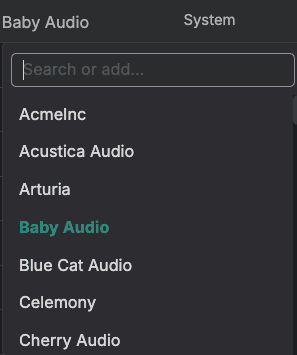
Click any plugin’s manufacturer to change it, then pick from the existing list or type your own custom manufacturer name. Clean up mislabelled plugins and group them exactly how you want. Your manufacturer edits are preserved through rescans, offloads, and restores.
Find Duplicate Plugins
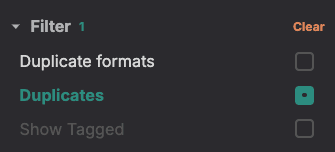
New Duplicate formats and Duplicates filters surface plugins that exist in more than one place, so you can spot copies scattered across multiple folders and decide which to keep or offload.
Plugin Path Column
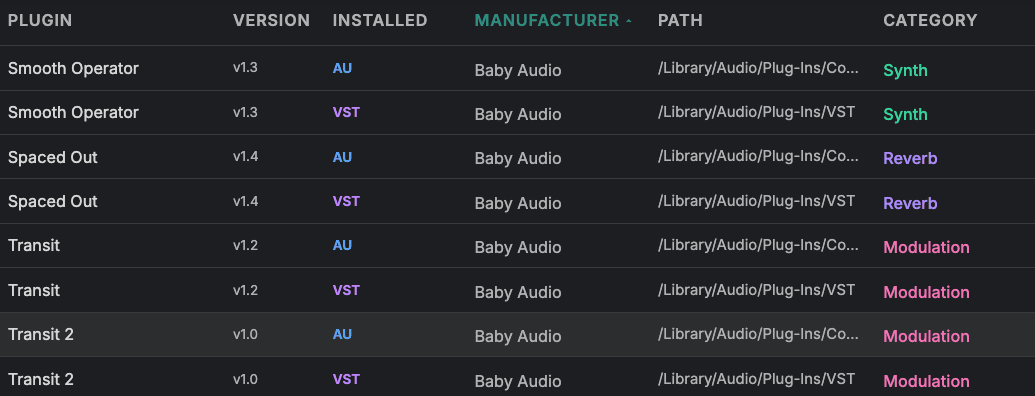
A new Path column shows the exact folder each plugin is installed in, making it easy to see where everything lives and track down plugins in non-standard locations.
Column Picker
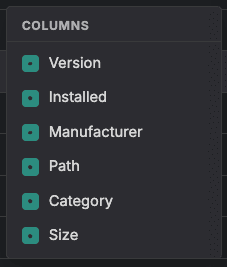
Choose which columns to display (Version, Installed, Manufacturer, Path, Category, and Size) from a new column picker. Build the view that suits how you work and hide the rest.
Rebuilt Offloaded View
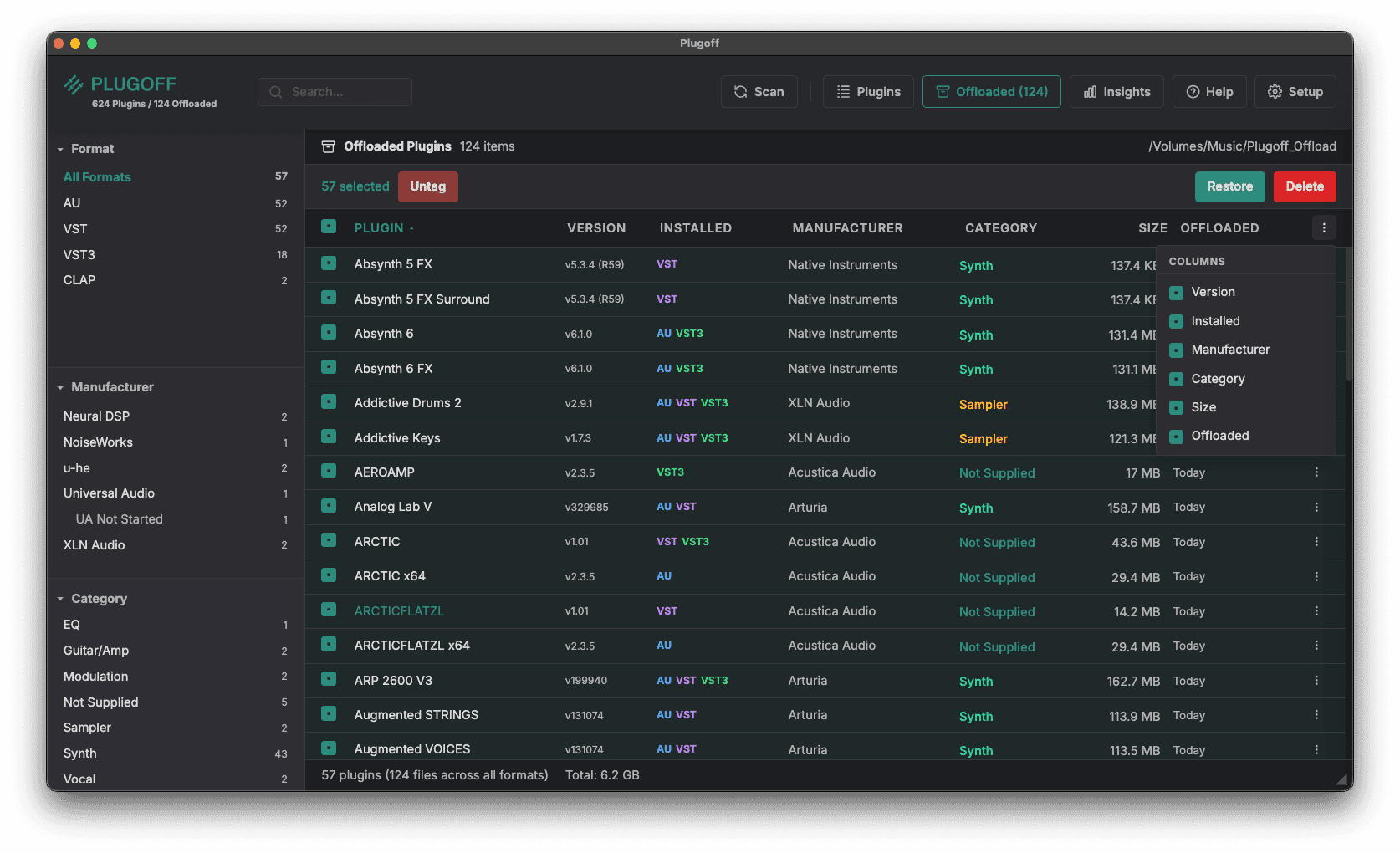
The Offloaded view has been rebuilt from the ground up to match the main plugins view, with full columns, filters, and the same column picker. Managing what you’ve offloaded is now just as powerful as managing what’s installed.
Offloaded Date
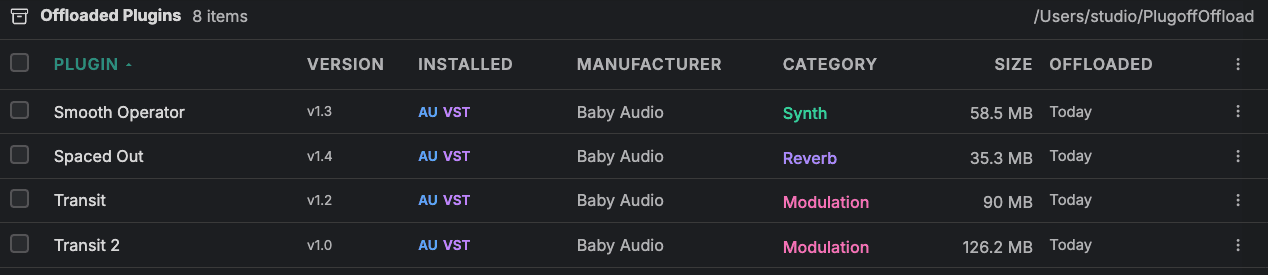
The Offloaded view now shows when each plugin was offloaded, so you can see at a glance how long something has been put away. If a plugin has been sitting offloaded for ages and you have never needed it back, that is a good sign you can permanently delete it and reclaim the space for good.
Improvements & Fixes
Smaller changes that add up
- Plugoff remembers its window size, position, and which monitor it was on, reopening exactly where you left it across multi-monitor setups
- App scaling no longer overlaps the search box, so the toolbar stays clean at every zoom level
- Cancelling an offload or restore now leaves everything untouched with a clean rollback, instead of a half-finished state
- Mono variants are no longer mis-named (looking like duplicates) after an offload or restore
- Format-filtered selection no longer ticks both formats of a plugin with one click. It respects the active format filter
- A plugin’s subcategory is now saved on cross-volume offloads, where it previously showed “Not Supplied”
UAD System Profiles, Zoom Controls & Faster Scanning
Full UAD System Profile import on both platforms, adjustable font sizing, and dramatically faster plugin scanning headline this release, alongside a set of fixes for Windows users.
Do a manual plugin scan after updating to see all improvements.
New Features
Overhauled UAD System Profile Matching
A completely reworked UAD matching engine now achieves full plugin coverage on both Mac and Windows. Every Universal Audio plugin is correctly identified and matched to its license status across all formats.
Zoom Controls
Adjust the font size from the status bar using the new zoom controls. Make text larger or smaller to suit your screen and preference.
Faster Plugin Scanning
Scanning your plugins is now a matter of seconds. A completely rewritten scanning engine makes the initial scan and rescans significantly faster on both Mac and Windows.
Improvements
Window Size & Font Persistence
Your app window size and font size are now remembered between sessions. Plugoff opens exactly how you left it.
PDF Report Categories
Exported PDF reports now use the correct category names as shown in the app, matching any custom categories you have set.
Windows: Mono Variant Grouping
Mono plugin variants are now correctly grouped with their stereo counterparts on Windows, giving an accurate unique plugin count.
Windows: UADx Plugin Naming
UADx (native CPU) plugins now display their correct names on Windows, fixing cases where they previously showed raw file names.
Custom Folders, Editable Categories & Plugin Notes
A major update focused on organisation and customisation. Add your own plugin folders, edit categories, attach notes to plugins, and scan CLAP format — plus better naming, UAD detection, and a redesigned Insights dashboard.
Do a manual plugin scan after updating to see all improvements.
New Features
Custom Plugin Folders
Scan plugins from any directory on your system — not just the default locations. A source filter dropdown lets you view plugins by where they came from, making it easy to manage third-party or portable plugin collections.
Editable Categories
Click any plugin’s category to change it. Search through existing categories or add your own custom ones. Bulk category changes let you recategorise multiple plugins at once. Your custom categories are preserved through rescans, offloads, and restores.
Add Notes to Plugins
Attach text notes to any plugin — reminders, project associations, or setup instructions. Notes are visible in both the plugins and offloaded views, and are fully searchable. Your notes are preserved through rescans, offloads, and restores.
CLAP Format Support
Plugoff now scans and manages CLAP plugins alongside AU, VST, VST3, and AAX. CLAP plugins are detected, categorised, and can be offloaded and restored like any other format.
CSV Export
Export your plugin collection as a CSV spreadsheet from the Insights dashboard, alongside the existing PDF export. Includes plugin name, format, category, manufacturer, size, version, and notes.
New DAW Support
Added Cakewalk Sonar and Digital Performer to the DAW recommendations engine, including their default plugin scan paths on Windows.
Improvements
Improved Naming Detection & Metadata Extraction
Plugins now group more accurately across formats using CFBundleDisplayName and CFBundleName from bundle metadata. VST3 plugins read Sub Categories from moduleinfo.json for more precise automatic categorisation.
Improved Keyword Matching
Category detection uses hybrid strict and relaxed word boundaries, preventing short keywords from producing false matches while still catching longer, unambiguous terms.
Better UAD & UADx Plugin Detection
Improved separation and naming of Universal Audio DSP (UAD) and native CPU (UADx) plugins, with more reliable license matching and manufacturer identification across all formats.
Expanded Manufacturer Detection
Added 17 new bundle ID entries for more accurate manufacturer identification, covering additional third-party plugin developers.
Redesigned Insights Dashboard
The Insights dashboard has been refreshed with an updated layout, cleaner stats cards, and CSV export sitting alongside the existing PDF export.
Subfolder Scanning, Mono Grouping & UAD Matching
Deeper plugin discovery, smarter grouping, and improved Universal Audio license matching make this the most complete scan yet.
New Features
Subfolder Scanning
Plugin scanning now recurses into manufacturer and category subfolders (up to 3 levels deep), discovering plugins that live outside root plugin directories. This picks up plugins from Universal Audio, Eventide, Soundtoys, Steinberg, Softube, u-he, and other manufacturers who install into nested folders.
Mono Variant Grouping
Mono variants — plugins with “(m)” or “(Mono)” in their name — are now grouped with their stereo parent as a single plugin entry. This reduces clutter and gives a more accurate unique plugin count.
UAD License Matching for VST/VST3
UAD license status now matches VST and VST3 variants via base name lookup, so all formats of a Universal Audio plugin show consistent license information.
Improvements
Accurate Plugin Counts
- “All Formats” count now shows grouped plugins rather than raw file count
- Header plugin count reflects unique plugins after grouping
Offload Folder Safety
Offload folder existence is verified before every offload and restore operation. If the folder is missing (e.g. external drive disconnected), a helpful dialog is shown so you can reconnect or choose a new location.
Initial Release
The first production release of Plugoff, a free DAW plugin manager for macOS and Windows. Scan, categorise, offload, and restore audio plugins across all major formats with smart recommendations and Universal Audio license detection.
Plugin Scanning
Multi-Format Scanning
Scans all standard plugin directories for AU, VST, VST3, and AAX formats. Extracts metadata including name, manufacturer, version, architecture (Apple Silicon, Intel, Universal), and file size.
Smart Categorisation
Plugins are automatically classified into 16 categories — Synthesiser, Sampler, Effects, Dynamics, EQ, Reverb, Delay, Modulation, Distortion, Utility, Analyser, and more — using keyword analysis of the plugin name and manufacturer.
Manufacturer Detection
Five fallback strategies ensure accurate manufacturer identification: AU plist name parsing, AudioComponents field lookup, bundle ID extraction, copyright string parsing, and name prefix mapping.
Format Grouping
Plugins available in multiple formats (AU + VST3, for example) are grouped into a single entry with format badges, giving you a clear picture of your unique plugin collection.
Offloading & Restoring
One-Click Offload
Move unused plugins from their installed location to a safe vault folder with a single click. Your DAW sees fewer plugins and loads faster. Offloaded plugins can be restored at any time.
Bulk Operations
Select multiple plugins and offload or restore them all at once. A progress dialog shows real-time status with admin authentication requested only once per batch.
Permanent Delete
Offloaded plugins can be permanently deleted from the vault with a type-to-confirm safety dialog. Deleted files are sent to the system Trash for an extra safety net.
Configurable Vault Folder
Choose any location for your offload vault, including external drives. Plugoff warns if the chosen folder is inside a cloud-synced directory (iCloud, Dropbox, OneDrive, Google Drive).
Smart DAW Recommendations
Redundant Format Detection
Select the DAW(s) you use and Plugoff identifies plugin formats your DAW doesn’t need. For example, if you only use Logic Pro (AU), Plugoff flags VST, VST3, and AAX formats as redundant and recommends them for offloading.
Universal Audio Integration
UAD License Detection
Import your UA System Profile from UA Connect and Plugoff matches it against your installed plugins using 7 fuzzy matching strategies plus a hard rules map. See which UA plugins are Authorised, Demo, Not Started, or Trial Expired — directly in the sidebar.
UADx / UAD Separation
Native CPU plugins (UADx) and DSP hardware plugins (UAD) are shown as separate manufacturers, making it easy to manage each type independently.
Insights Dashboard
Visual Analytics
A dashboard view with animated donut charts showing your plugin collection broken down by manufacturer, format, and category. Cascading counters and spring-animated table cells bring the data to life.
PDF Export
Export a full report of your plugin collection as a PDF, including counts, categories, and format breakdowns.